
Stable Micro Systems logo
Request a quote
  • Texture analysis
    • Texture Analysers
    • TA.XTplusC
    • TA.XTplus100C
    • TA.HDplusC
    • TA.XTExpressC
    • Compare Texture Analysers
    • Texture Analyser Buying Guide: 7 questions you need to ask
    • Software
    • Upgrades
    • Learn
    • Why measure texture?
    • How a Texture Analyser works
    • A beginner’s guide
    • What is food texture?
    • Texture Profile Analysis (TPA)
    • Texture analysis properties
    • Application areas
    • Speed up your testing
    • Case Studies
    • Attachments and accessories
    • Probes
    • Attachments
    • Acoustic Envelope Detector
    • Video Capture and Synchronisation System
    • Automated Linear Indexing System
    • Temperature Control
    • Dough Inflation System
    • Dynamic Integrated Balance
    • Penetrometer
    • IDDSI System
    • Egg Quality Testing System
    • Accessories
    • Custom design service
    • Test types
    • Puncture and penetration
    • Compression
    • Cutting and shearing
    • Extrusion
    • Bend and flexure
    • Tension
    • Adhesion
    • Other test types
    • Applications
    • Food
      • Alternative proteins
      • Bakery
      • Cereals
      • Confectionery
      • Dairy
      • Gels and films
      • Fish
      • Fruit and vegetables
      • Meat
      • Pasta and noodles
      • Snacks
      • Petfood and animal feed
      • Powder and granules
    • Future and novel foods
      • 3D printed foods
      • Cell cultured foods
      • Foods containing CBD
      • Foods containing insects
      • Upcycled food
      • Vertically farmed foods
    • Reformulated foods
      • Free-from foods
      • Fortified foods
      • Low-in foods
      • Foods for dysphagia (IDDSI)
    • Materials and products
      • Adhesives
      • Electronics
      • Packaging
      • Gels and films
      • Innovative materials
      • Leather and textiles
      • Paper and cardboard
      • Polymers
      • Powder and granules
    • Pharmaceutical and medical
      • Dental
      • Medical devices
      • Pharmaceutical and medical
      • Pharmaceutical packaging
    • Cosmetics and personal care
      • Cosmetics and skincare
      • Personal care products
      • Hair and haircare products
    • Powders and granules
    • View all
  • Materials testing
    • Materials Testers
    • TA.HDplusC
    • TA.XTplus100C
    • Compare Materials Testers
    • Upgrades
    • Learn
    • What is materials testing?
    • Force testing
    • Materials testing properties
    • Application areas
    • Software
    • Case Studies
    • Attachments and accessories
    • Probes
    • Attachments
    • Acoustic Envelope Detector
    • Video Capture and Synchronisation System
    • Automated Linear Indexing System
    • Temperature Control
    • Dynamic Integrated Balance
    • Penetrometer
    • Resistance Conversion Unit
    • Accessories
    • Custom design service
    • Test types
    • Puncture and penetration
    • Compression
    • Cutting and shearing
    • Extrusion
    • Bend and flexure
    • Tension
    • Adhesion
    • Other test types
    • Applications
    • Materials and products
      • Adhesives
      • Electronics
      • Packaging
      • Gels and films
      • Innovative materials
      • Leather and textiles
      • Paper and cardboard
      • Polymers
      • Powder and granules
    • Pharmaceutical and medical
      • Dental
      • Medical devices
      • Pharmaceutical and medical
      • Pharmaceutical packaging
    • Cosmetics and personal care
      • Cosmetics and skincare
      • Personal care products
      • Hair and hair products
    • View all
  • Volume and density
    • Volscan Profiler
    • Volscan Profiler instrument
    • How the Volscan Profiler works
    • Measuring volume and density
    • Software
    • Technical specification
    • Accessories
    • Case Studies
    • Applications
    • Bakery
    • Eggs
    • Other foods
    • Materials
    • Hair
    • Ceramscan
    • Ceramscan instrument
    • How the Ceramscan works
    • Measuring ceramic density
    • Ceramic and advanced material tests
    • Software
    • Technical specification
    • Ceramscan Validation
  • Powder flow
    • Products
    • Powder Flow Analyser
    • TA.XTplusC Texture Analyser
    • Learn
    • How the Powder Flow Analyser Works
    • Why measure powder flow?
    • Typical powder flow problems
    • Vessel material options
    • Software
    • Technical specification
    • Powder examples
    • Powder flow instrument comparison
    • Case studies
    • Test types
    • What problem, what test?
    • Cohesion
    • Cohesion at 4 speeds
    • Caking
    • Powder Flow Speed Dependence
    • Compressibility
    • Consolidation and caking
    • Complementary powder tests
    • Understanding your powder flow test results
    • How to characterise an unknown powder sample
    • Applications
    • Food ingredients and blends
    • Pharmaceuticals / nutraceuticals
    • Cosmetics and personal care
    • Agriculture
    • Chemicals, additives and industrial
    • Batteries and advanced materials
    • 3D printing
  • Applications
    • Food
    • Alternative proteins
    • Bakery
    • Cereals
    • Confectionery
    • Dairy
    • Gels and films
    • Fish
    • Fruit and vegetables
    • Meat
    • Pasta and noodles
    • Snacks
    • Petfood and animal feed
    • Powder and granules
    • Future and novel foods
    • 3D printed foods
    • Cell cultured foods
    • Foods containing CBD
    • Foods containing insects
    • Upcycled food
    • Vertically farmed foods
    • Reformulated foods
    • Free-from foods
    • Fortified foods
    • Low-in foods
    • Foods for dysphagia (IDDSI)
    • Materials and products
    • Adhesives
    • Electronics
    • Packaging
    • Gels and films
    • Innovative materials
    • Leather and textiles
    • Paper and cardboard
    • Polymers
    • Powder and granules
    • Pharmaceutical and medical
    • Dental
    • Medical devices
    • Pharmaceutical and medical
    • Pharmaceutical packaging
    • Cosmetics and personal care
    • Cosmetics and skincare
    • Personal care products
    • Hair and haircare products
  • Discover
    • Resources
    • Blog
    • Request a brochure
    • Request an article
    • Published references
    • Recommended literature
    • YouTube channel
    • Subscribe to our newsletter
    • FAQs
    • Case studies
    • Food
    • Materials
    • Pharmaceutical and medical
    • Cosmetics, skincare and haircare
    • Volume and density
    • Powder flow
    • About us
    • Company profile
    • Why we are world leaders
    • News
  • Support
    • General
    • Software updates
    • Register a product
    • FAQs
    • Correct use of TPA
    • Glossary
    • Subscribe to our newsletter
    • User support
    • Troubleshoot your instrument
    • Technical support form
    • Test advice service
    • Macro writing service
    • Get a new manual
    • Education Zone
    • Tips for Exponent Connect users
    • Training courses
    • Contact your local distributor
    • Product maintenance
    • Calibration
    • Upgrade your instrument
    • UK maintenance plan
  • Contact
    • Contact details
    • Find a distributor
    • Request a demonstration
    • Request a quote
    • Events and seminars
  • Login
    • Customers
    • Distributors
Request a quote

Help with Calibration

Maintain instrument accuracy with regular calibration. Follow these steps.

A technician calibrating a Texture Analyser using a calibration weight

The system is supplied with a factory force calibration (which can be restored at any time). However, if you wish to calibrate at a specific weight, you can perform the following procedure:

Calibrate force

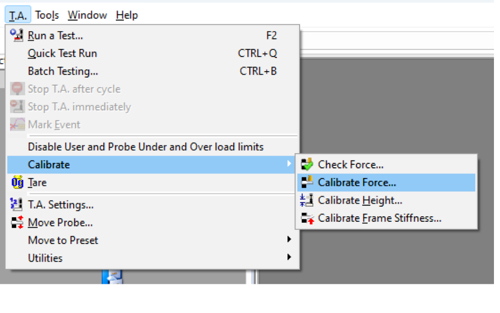
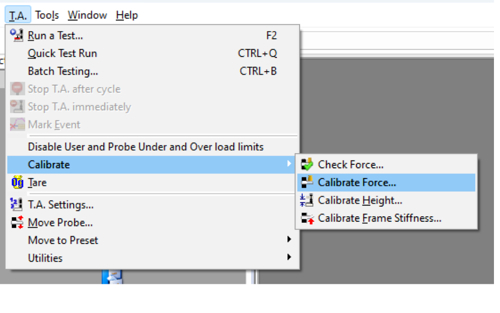
1. From the tool bar menu, click on T.A. > Calibrate > Calibrate Force.
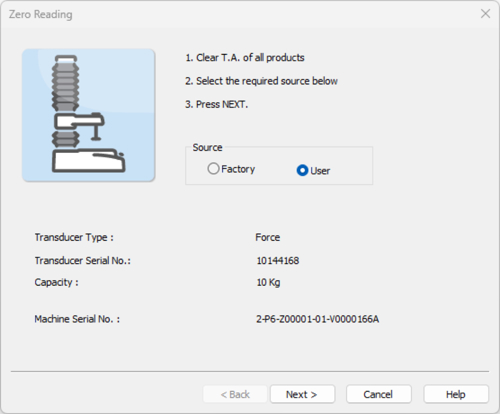
2. Select either Factory or User, as required. The installed Load Cell capacity is identified.
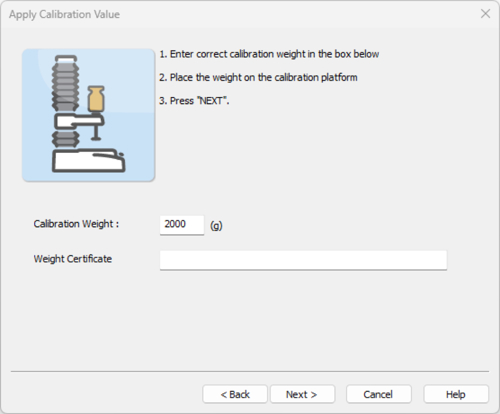
3. Select the calibration weight of your choice.
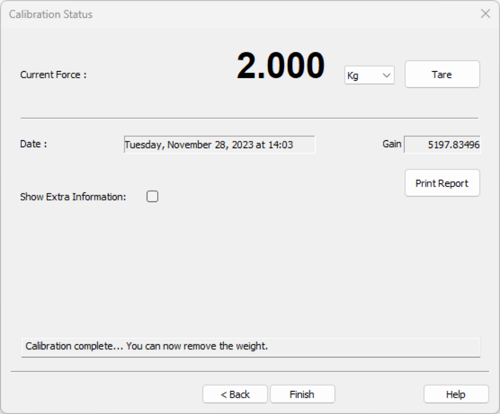
4. This window should be displayed. Remove the weight from the calibration platform.
Calibrate probe height

Only required if you wish to: a: measure in % strain; b: record the height of the product during the test; c: use a button trigger; d: start each test from the same position; e: pre-set probe positions in the Move Probe window.

1. From the tool bar menu, click on T.A. > Calibrate > Calibrate Height.
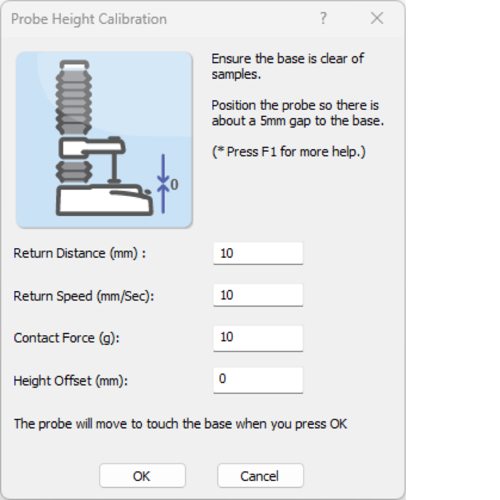
2. Select the Return Distance and the Speed you wish the probe to move to this once it has touched the contact surface (0mm).
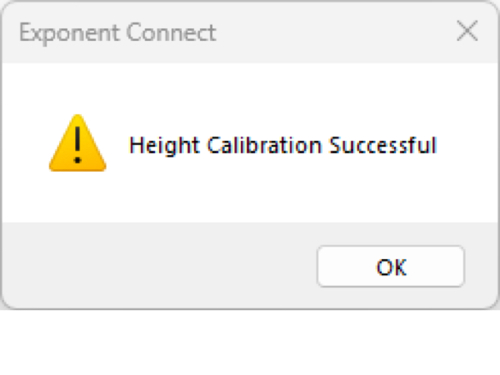
3. If probe height calibration has been successful, this window will be displayed.
Calibration ensures the measured force and distance values reflect true physical values. You should calibrate after moving the instrument, after a load cell change, or if you suspect overload from a previous use.

There’s no strict rule, but as a guideline:
• After any major change (Load Cell swap, overload event)
• If multiple operators use it
• At regular intervals (e.g., weekly/monthly) depending on lab practice
Because the process takes minutes, frequent checks help ensure consistent quality in testing.

• Force calibration ensures the load cell accurately converts electrical signal to force values.
• Height (probe) calibration sets the zero distance reference so that product height and strain are measured correctly.

Not necessarily – calibration frequency should reflect how critical measurement accuracy is for your purposes and how often the instrument setup changes. Daily calibration is possible but often more than needed for stable setups.

Yes. Incorrect calibration can skew force and distance data, leading to misleading comparisons between samples or over time. Regular calibration maintains confidence in data repeatability and comparability.

Use a known calibration weight appropriate for the load cell capacity you intend to utilise - ideally at least 10% of your maximum force range.

If the calibration check or return-to-zero steps don’t match expected results:
• Re-check that the calibration weight is correct
• Confirm the instrument wasn’t recently overloaded
• Contact technical support if results remain inconsistent.

Without proper calibration, force or height values might drift over time, potentially compromising quality control, R&D decisions, or comparative testing. Frequent calibration prevents this risk and is good laboratory practise.

Request manuals and user guides
Request testing advice
See all support options
Home
  • Contact
  • Send us an enquiry
  • Request a quote
  • Request a demonstration
  • Find a distributor
Head office

+44 (0) 1483 427345
Vienna Court, Lammas Road
Godalming, Surrey, GU7 1YL
United Kingdom

Subscribe to our newsletter
  • LinkedIn
  • YouTube
  • X (formerly Twitter)
  • Facebook
Copyright © 2026 Stable Micro Systems. All rights reserved. Privacy and cookie policy Sitemap